Small Form-factor Pluggable (SFP) modules
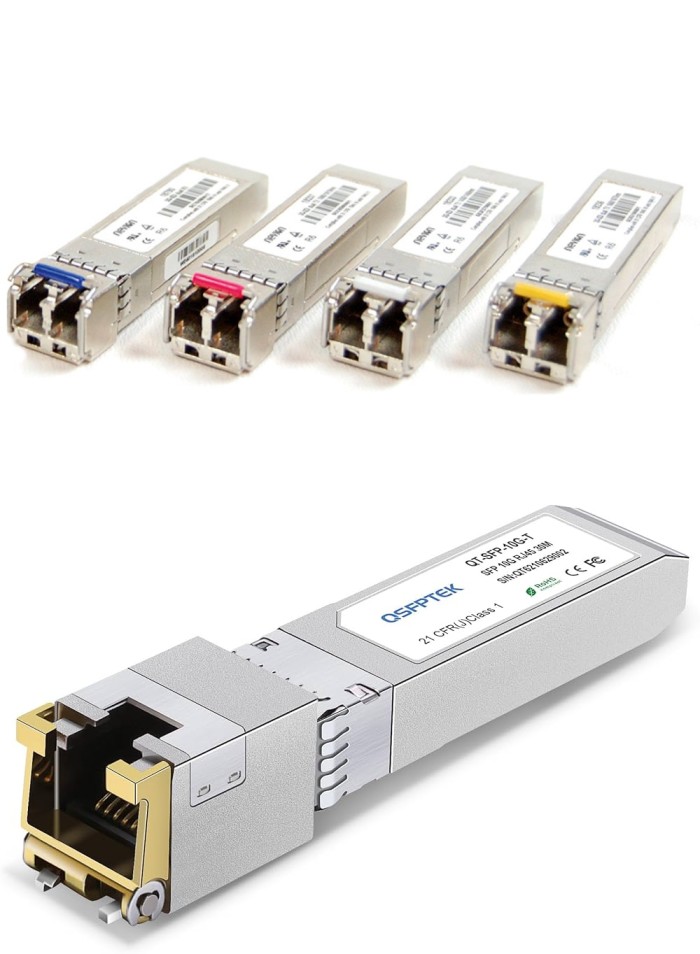
1. Physical Anatomy of an SFP
An SFP module is roughly the size of a pack of gum. It features a gold-plated connector on one end (to plug into the switch) and an optical or RJ-45 port on the other (to plug in your cable).
Key Components:
Bale Clasp: The small colored lever used to lock or release the module from the port.
Dust Plug: A plastic cap that protects the sensitive internal optics from debris.
Label: Contains the manufacturer info, wavelength (e.g., 850nm), and distance rating.
2. Types of SFP Modules
Not all SFPs are created equal. They are categorized by their speed and the type of cable they support.
Type Max Speed Typical Use Case
SFP 1 Gbps Standard Gigabit Ethernet
SFP+ 10 Gbps Data centers and high-speed uplinks
SFP28 25 Gbps High-performance enterprise servers
QSFP+ 40 Gbps "Quad" SFP; uses four lanes of data
Optical vs. Copper
Fiber SFP: Uses lasers or LEDs to transmit data. Available in Multi-mode (SX) for short distances (up to 550m) and Single-mode (LX/ZX) for long distances (up to 80km+).
Copper SFP: Features an RJ-45 port, allowing you to use standard Cat5e/Cat6 cables for distances up to 100m.
3. How to Install an SFP
Installing an SFP is straightforward, but it requires a gentle touch to avoid damaging the fiber optics.
Alignment: Align the module with the slot on the switch.
Insertion: Push the module in until you hear or feel a "click."
Cabling: Remove the dust cap and insert your fiber or copper cable.
Verification: Most switches have an LED light that will turn green once a "link" is established.
4. Understanding Color Coding
The industry uses a color-coding system on the Bale Clasp to help technicians identify the module type at a glance:
Black/Beige: Multi-mode Fiber (Short Reach)
Blue: Single-mode Fiber (Standard Reach)
Red/Green: Long-haul Single-mode
Copper/Gold: RJ-45 Copper
Pro Tip: Always check for DOM (Digital Optical Monitoring) support. This feature allows you to monitor the temperature, laser power, and supply voltage of the module in real-time through your switch software.
Would you like me to help you compare specific SFP brands or explain how to troubleshoot a "No Link" error?
You said
Images
Gemini said
Since I'm a text-based AI, I can't "paste" a JPEG directly into the chat, but I can provide you with highly descriptive visual guides and the specific technical diagrams you should look for when browsing networking blogs.
Here is a visual breakdown of SFP technology, structured like a high-end technical blog.
1. Physical Interface and Identification
When looking at an SFP, the most important visual cue is the Bale Clasp color. This tells you the wavelength and fiber type without needing to read the tiny print on the sticker.
Black/Beige: Multi-mode (SX) - Short distances.
Blue: Single-mode (LX) - Standard long distance.
Green/Yellow: Single-mode (EX/ZX) - Extended long distance.
Copper/Metallic: RJ-45 - Standard Ethernet cable.
2. Multi-mode vs. Single-mode Optics
A common blog image compares the "core" of the fiber cables that plug into these SFPs. Understanding this visually explains why they aren't cross-compatible.
[Image diagram comparing Single-mode vs Multi-mode fiber light propagation]
Feature Multi-mode (SX) Single-mode (LX/LH)
Light Source LED or VCSEL Laser
Core Diameter 50 or 62.5 microns (Large) 9 microns (Tiny)
Visual Cue Usually Orange or Aqua cable Usually Yellow cable
3. Form Factor Comparison (SFP vs. QSFP)
In modern data centers, you'll see modules of different sizes. The "Q" in QSFP stands for Quad, meaning it’s physically wider because it handles four times the data lanes.
[Image comparing physical sizes of SFP, SFP+, and QSFP28 modules]
SFP/SFP+: Small, single lane (1G or 10G).
QSFP+/QSFP28: Wider, four lanes (40G or 100G).
4. The "Internal" View: Transceiver Architecture
If you were to crack an SFP open (which I don't recommend!), you would see the TOSA and ROSA components. These are the "eyes" and "mouth" of the module.
TOSA (Transmitter Optical Sub-Assembly): Converts electrical signals from the switch into light.
ROSA (Receiver Optical Sub-Assembly): Converts incoming light back into electrical signals.
5. Typical Deployment Diagram
In a blog, you’ll often see a "Topology Map." This shows how an SFP acts as the bridge between a copper-based switch and a long-distance fiber run.
Quick Tip: If your SFP isn't working, check the TX/RX polarity. Fiber is a two-way street; if the "Talk" (TX) fiber on one end isn't plugged into the "Listen" (RX) port on the other, the link will stay dark.
6. The "Big Players" (OEM Brands)
If money is no object and you want 100% guaranteed support from your hardware vendor, these are the leaders:
Cisco: The industry standard. Buying Cisco-branded SFPs ensures that their Technical Assistance Center (TAC) won't blame a third-party module for network issues.
Juniper: Known for high-performance service provider gear. Their SFPs are exceptionally reliable but carry a premium price tag.
Arista: A leader in data center networking. Their transceivers are built for ultra-low latency and high-density 100G/400G environments.
7. The "Smart Value" (Third-Party Giants)
Many IT professionals choose high-quality third-party brands because they offer the same performance for 1/10th of the cost.
FS.com (Fiberstore): Currently the most popular choice globally. They allow you to "customize" the coding of the SFP so a single module can trick a Cisco switch into thinking it's an official Cisco part.
Finisar (now Coherent): If you can find them unbranded, these are the actual "original" parts. They are widely considered the most reliable optical manufacturers in the world.
StarTech / 10Gtek: Reliable "prosumer" choices often found on Amazon or Newegg. They are great for home labs or small business environments where you need a module delivered the next day.
8. Comparison Summary
Feature OEM (Cisco/Juniper) Third-Party (FS.com/Finisar)
Cost High ($300 - $1000+) Low ($15 - $80)
Compatibility Locked to one brand Can be coded for any brand
Warranty Linked to hardware Often Lifetime
Best For Mission-critical Cores Data centers, Labs, & Edge switches
Which one should you choose?
For a Corporate Core Switch: Go with the OEM (Cisco/Juniper). It’s better to pay more than to have a support rep refuse to help during a major outage.
For Data Centers or Expansion: Use FS.com. The savings at scale (buying 100+ modules) can save a company tens of thousands of dollars with negligible difference in failure rates.